
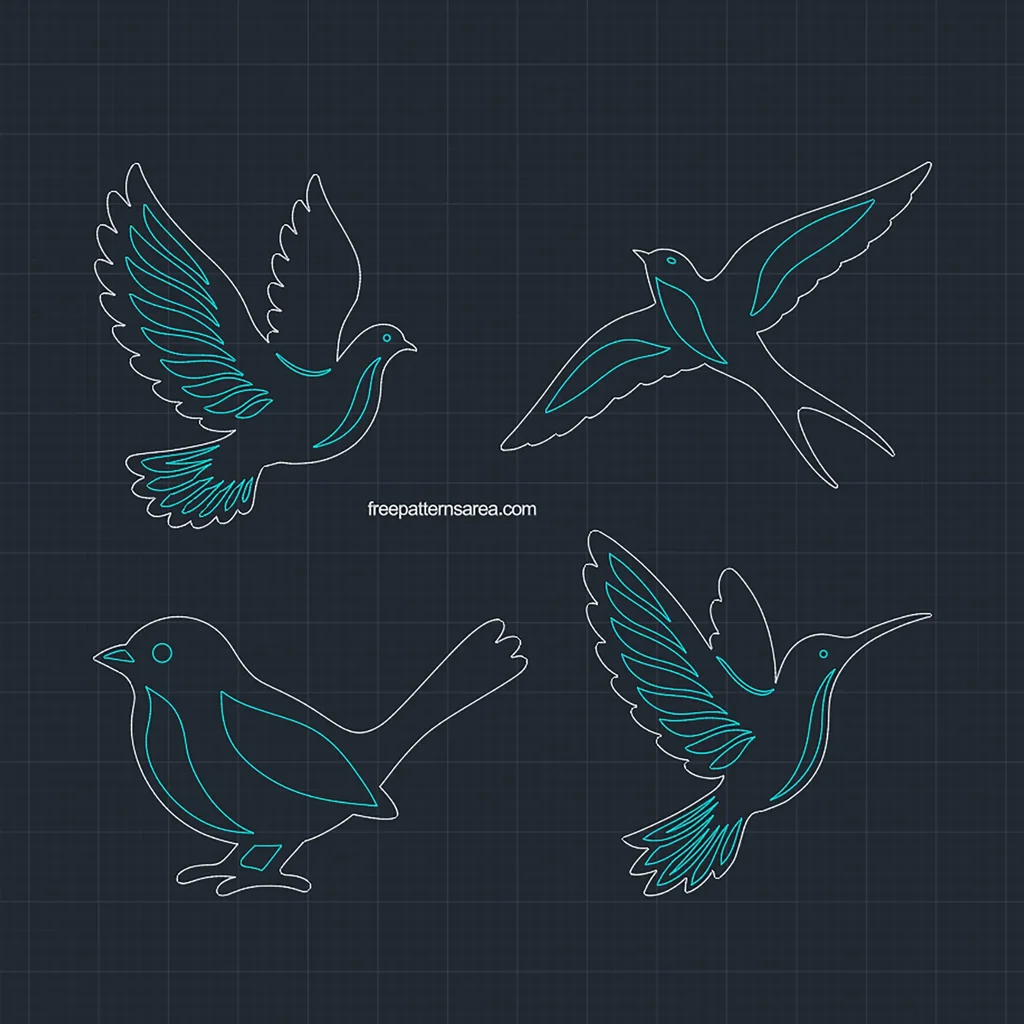
A dove, a swallow, a songbird and a hummingbird are drawn together in this DWG, and each bird is built from one outer contour and a set of closed feather, breast and eye details. This free bird DWG CAD block drawing is ready for AutoCAD layouts, hatching and CNC router work.
When I take these birds to a CNC router, I carve the feather details as shallow pockets and fill them with dark paint before the outer profile is cut. The finished bird then carries its feathers as a second color inside the wood, and the light surface of the board frames them from every side.
Outline and Detail Layers for Every Bird
The drawing is saved in AutoCAD 2000 DWG format with millimeter units, so it opens in current AutoCAD versions and in most CAD programs that read DWG. The four birds sit at least 50 mm apart in a layout of about 600 × 526 mm, and each bird has the following size:
- Dove: 231 × 261 mm
- Swallow: 308 × 234 mm
- Songbird: 310 × 200 mm
- Hummingbird: 249 × 261 mm
Every bird has its own pair of layers. One layer holds the outer contour, and the other holds the feather, breast and eye details, which are also drawn in blue. All contours are closed splines, and the eyes are circles, except for the swallow, whose eye is an ellipse. Because every boundary is closed, a HATCH command picks each area cleanly, so you can fill the body and the details with two different solid hatches and turn any bird into a two-tone vector drawing.
The birds are drawn as loose geometry, and the file contains no block definitions. You can define each bird as a block with your own base point, or make separate blocks from its outline and detail layers, and then insert the birds into a panel layout, a sign drawing or a decorative wall design at any scale you need.
For CNC routing, the bit has to fit into the details. At the file size, the narrowest details are about 2.7 mm wide and the material between neighboring details is about 2.9 mm, while the eyes measure about 4.5 mm on the dove and 4.9 mm on the hummingbird. A 1/16 inch or 2 mm end mill therefore enters every detail, whereas a 1/8 inch bit leaves material in the narrowest feather tips. V-carving suits these feathers well, since the V-bit follows the tapering shapes into their points. In either case, carve or pocket the details first and cut the outer profile last, so the bird stays fixed to the board while the inner work is done. If you want the details to become through-openings, cut them as inside profiles with the same small bit before the outer profile.
Download the Free Bird DWG CAD Block Drawing
The download contains one DWG file with all four birds.
- Format: DWG, AutoCAD 2000, millimeters
- Content: dove, swallow, songbird and hummingbird in one drawing
- Layers: one outline layer and one detail layer for each bird
- Geometry: closed splines as loose geometry, ready to be defined as blocks
- Overall layout: about 600 × 526 mm
Download the bird DWG and open it in AutoCAD or your CAD program. Then define the bird you need as a block, or send its outline and detail layers to your CAM software and choose the bit for the carving.
Looking for other formats of this design? Our full collection includes SVG, PDF, DXF, PNG, CDR and STL files. You can access them all on the main collection page.
License and Usage
These files are licensed under CC BY-NC-SA 4.0 for strictly personal, non-commercial use.
You are free to download, cut, and modify these designs for your personal projects. However, you may not sell the digital files or any physical products manufactured from them. If you share a modified version of this design, you must credit FreePatternsArea and distribute it under this exact same license.
Unauthorized redistribution, reproduction, or commercial exploitation of these files is a violation of intellectual property rights and may result in legal action.